

Another day, another wacky workload
I use GitHub Actions all the time - for linting, testing, and building artifacts like container images. The GitHub Actions Runners hosted on their infrastructure work by and large.
Now, you can of course self-host your own Runners on your own infrastructure which can be handy for sensitive data or to make accessing private resources easier, among other things. To do so you just need to install the GitHub Actions Runner software on some system, be that a VM or…in a container. And I love me some containers.
Now, there’s something called the GitHub Actions Runner Controller - something you can install on a Kubernetes cluster. It will listen for pending jobs in a GitHub Actions Workflow, and execute them in containers on that Kubernetes cluster.
What about running GitHub Self-hosted Runners on Red Hat OpenShift?
Background Information
So a typical GitHub Actions Workflow for building containers may look something like the following:
- Check out code
- Prepare environment, eg mux build variables
- Log into a container registry
- Setup QEMU and Docker Buildx for multi-architecture builds
- Build container images
- Merge multi-arch images into a manifest
- Push images/manifest to a container registry
And then of course you could do other things like generate/submit SBOMs, vulnerabiliity reports, etc.
By default using the runners hosted by GitHub, steps in the workflow job execute in a small VMs that run Ubuntu/Mac/Windows guests with a whollllle lot of things pre-installed. The VMs are privileged, which means the runner user can do things via sudo, and many things are already set up like Docker.
Now, while you can run VMs in OpenShift, GitHub Actions Runner Controller orchestrates Pods and workflows executed within them.
And if you know anything about OpenShift - it’s that it does not like running rootful containers. You can do it, it’s just a best practice not to and blocked by default until you permit the ServiceAccount the Pod is using to leverage a higher privileged SecurityContextConstraint like anyuid or privileged. This issue isn’t often seen because most other Kubernetes platforms allow running unsafe rootful containers without so much of an alert - we like to think OpenShift is “secure by default”.
While you could provide ARC’s executed workflows with the privileged SCC to allow rootful Runners, this isn’t a great idea - this greatly increases the chance for container escapes and host traversal, among other nasty things that are kinda important in our day and age with AI hacking things so fast and easily.
So Kubernetes/OpenShift has this thing called User Namespaces. tl;dr - you can run workloads in a cgroup v2 managed namespace that isolates UID/GID mappings from the host. This lets you safely run those privileged workloads, just as they are, without impact to the host.
Note: User Namespaces don’t support all storage interfaces, eg NFS-backed volumes from a vendor that does not support ID-mapped mounts.
So the goal of this exercise is to run a common GitHub Action Workflow, with minimal/no modifications - on OpenShift.
How hard could it be?
OpenShift Setup
So while OpenShift ships with a nested-container SCC for use with User Workloads, it’s scope needs to be expanded a bit to support rootful Runners. There are a few other steps we need to make, eg modifying a Namespace with the needed annotations, some RBAC, etc…
---
apiVersion: security.openshift.io/v1
kind: SecurityContextConstraints
metadata:
  annotations:
    kubernetes.io/description: 'nested-container-arc is specially tailored for running nested containers for GitHub Actions Runner Controller. It balances a tight security profile, while remaining loose enough to be useful to run nested containers in. In addition to requiring pods run with a user namespace, it allows some capabilities, allows any users within the range of 0-165537, allows privilege escalation (to allow a container engine to run new{uid/gid}map), and allows any seccomp profile. Since any pods running within this SCC must use a user namespace ("hostUsers: false"), their actual UID/GID on the host will be allocated by the kubelet to be unprivileged, and any capabilities the pod is granted will not apply outside of the pods user namespace.'
  name: nested-container-arc

# This requires Pods to use User Namespaces
userNamespaceLevel: RequirePodLevel
# Allows rootful users in a Pod
allowPrivilegedContainer: true
allowPrivilegeEscalation: true

# We don't want to allow host-level attachments
allowHostPorts: false
allowHostDirVolumePlugin: false
allowHostIPC: false
allowHostPID: false
allowHostNetwork: false
# Requires the matching KubeletConfig to allow the specified unsafe sysctls
allowedUnsafeSysctls:
  - net.ipv6.conf.all.disable_ipv6
  - net.ipv6.conf.default.disable_ipv6

# We set UID/GID ranges to the upper bound of the remapped UID/GIDs
runAsUser:
  type: MustRunAsRange
  uidRangeMax: 165537
  uidRangeMin: 0
fsGroup:
  ranges:
    - max: 165537
  type: MustRunAs
supplementalGroups:
  ranges:
    - max: 165537
  type: MustRunAs

# Shouldn't enable defaults, but allow things needed by rootful workloads like Docker/BuildX
requiredDropCapabilities: null
defaultAddCapabilities: null
allowedCapabilities:
  - SETUID
  - SETGID
  - SYS_ADMIN
  - NET_ADMIN
  - MKNOD
  - CHOWN

# Since Docker-in-Docker (DIND) is run as a sidecar, SELinux contexts
# must be wider than just container_runtime_t for the Runner image
seccompProfiles:
  - '*'
seLinuxContext:
  type: RunAsAny

# Misc things
readOnlyRootFilesystem: false
volumes:
  - configMap
  - csi
  - downwardAPI
  - emptyDir
  - ephemeral
  - image
  - persistentVolumeClaim
  - projected
  - secret
users: []
groups: []
priority: null
That SecurityContextConstraint is essentially a duplicate of the nested-container SCC, but with a wider UID/GID range, some allowed capabilities, etc to allow running Docker and the Runner. This isn’t useful without the RBAC needed to, well, use it…
---
apiVersion: rbac.authorization.k8s.io/v1
kind: ClusterRole
metadata:
  name: system:openshift:scc:nested-container-arc
rules:
  - apiGroups:
      - security.openshift.io
    resourceNames:
      - nested-container-arc
    resources:
      - securitycontextconstraints
    verbs:
      - use
We’ll get to binding that ClusterRole to the ServiceAccount later - but another handy bit of RBAC for later is the ability to query the cluster for the Internal Image Registry’s Route:
---
apiVersion: rbac.authorization.k8s.io/v1
kind: ClusterRole
metadata:
  name: get-registry-route
rules:
  - verbs:
      - get
      - list
      - watch
    apiGroups:
      - route.openshift.io
    resources:
      - routes
Annnnd that’s the bulk of the prereq setup on the platform level - let’s get into actually deploying GitHub ARC.
Deploy the GitHub Actions Runtime Controller
Now we need to deploy the thing that connects to GitHub and sets up listeners. This comes in the form of two Helm Charts, so probably the easiest way to deploy them is via ArgoCD/OpenShift GitOps and an Application{Set}.
Scale Set Controller Chart
The first is the ARC Scale Set Controller - this creates the CRDs and runs the controller that manges the CRs. This is done once per-cluster since it sets up CustomResourceDefinitions (CRDs).
---
# Application to deploy the GitHub ARC Scale Set Controller
apiVersion: argoproj.io/v1alpha1
kind: Application
metadata:
  name: github-arc-ssc
  namespace: openshift-gitops
  annotations:
    argocd.argoproj.io/manifest-generate-paths: ".;.."
    argocd.argoproj.io/compare-options: ServerSideDiff=true,IncludeMutationWebhook=true
    finalizers:
      # Forces background cascading deletion of all managed resources
      - resources-finalizer.argocd.argoproj.io
spec:
  project: default
  ignoreDifferences:
    # CRD syncs/updates sometimes get ArgoCD stuck
    - group: apiextensions.k8s.io
      jsonPointers:
        - /status
      kind: CustomResourceDefinition
  sources:
    - chart: 'gha-runner-scale-set-controller'
      repoURL: 'ghcr.io/actions/actions-runner-controller-charts'
      targetRevision: '0.14.2'
      helm:
        releaseName: 'arc'
        valuesObject:
          # Enable metrics endpoint
          metrics:
            controllerManagerAddr: ":8080"
            listenerAddr: ":8080"
            listenerEndpoint: "/metrics"
  destination:
    namespace: arc-systems
    # Use either name or server
    #name: 'in-cluster'
    server: 'https://kubernetes.default.svc'
  syncPolicy:
    # The metadata to set on the arc-systems namespace
    managedNamespaceMetadata:
      annotations:
        openshift.io/sa.scc.supplemental-groups: 0/165537
        openshift.io/sa.scc.uid-range: 0/165537
    # If you feel like letting Argo take the wheel
    automated:
      prune: true
      selfHeal: true
    syncOptions:
      - CreateNamespace=true
      - SkipDryRunOnMissingResource=true
      - ServerSideApply=true
      - RespectIgnoreDifferences=true
    retry:
      limit: 5
Yay! We have deployed the actual Actions Runner Controller!
Note: .spec.syncPolicy.managedNamespaceMetadata sets some annotations that allow the expanded UID/GID range for the DIND Runner in User Namespaces. If you’re doing this manually, make sure to apply those annotations to the Namespace.
Scale Set Chart
A couple key CRDs the Scale Set Controller Chart creates are a AutoscalingRunnerSet and AutoscalingListener. Our deployed CR instances are created by passing values to the Scale Set Chart (note the lack of Controller there…SSCC vs SSC…ugh).
This would be done per-repo, per-named-runner. Eg for two repos, you deploy the Scale Set Chart twice. If you want to give those two repos access to a GPU enabled builder, a Fedora base builder, and an Ubuntu base builder each, you’d roll 6 Scale Set Chart deployments.
The AutoScalingRunnerSet defines what the execution of the Workflows look like - eg what mode, what the Pod definitions look like, etc.
The AutoscalingListener targets a defined AutoScalingRunnerSet, then has extra configuration to define what repo it should listen for Workflows that match the Scale Set name. You can find the default values file here.
Of course you could collapse this ApplicationSet to an Application like above, or pass along a reference to an external values file, but for simplicity I’ve inlined it in a few ways below:
---
# ApplicationSet to deploy the GitHub ARC Scale Set
apiVersion: argoproj.io/v1alpha1
kind: ApplicationSet
metadata:
  name: github-arc-ss
  namespace: openshift-gitops
spec:
  # Allows templating of the spec
  goTemplate: true
  goTemplateOptions: ["missingkey=error"]
  # A matrixed generator that targets labeled clusters (synced by Advanced Cluster Management+GitOps integration)
  generators:
    - matrix:
        generators:
          - clusters:
              selector:
                matchExpressions:
                  - key: appset/helm-github-arc
                    operator: In
                    values:
                      - "true"
                      - "enable"
                      - "enabled"
          # You could honestly get rid of the list generator and just hard code the parameters below
          # I like this still because you could use them in loops or just to keep up above the fold (lazy scrollr)
          - list:
              elements:
                - appName: arc-ss
                  namespace: arc-systems
                  helmRepoURL: 'ghcr.io/actions/actions-runner-controller-charts'
                  helmChartName: gha-runner-scale-set
                  helmRevision: 0.14.2
  template:
    metadata:
      # .name is the matched cluster name in ArgoCD
      name: "{{.name}}-{{.appName}}"
      annotations:
        argocd.argoproj.io/manifest-generate-paths: ".;.."
        argocd.argoproj.io/compare-options: ServerSideDiff=true,IncludeMutationWebhook=true
        finalizers:
          # Forces background cascading deletion of all managed resources
          - resources-finalizer.argocd.argoproj.io
    spec:
      project: default
      sources:
        - chart: '{{.helmChartName}}'
          repoURL: '{{.helmRepoURL}}'
          targetRevision: '{{.helmRevision}}'
          helm:
            releaseName: '{{.appName}}'
            parameters:
              # Secret for GitHub Application Auth
              - name: "githubConfigSecret"
                value: kemo-labs-ocp-arc
              # Target repo URL for Workflows this Scale Set will listen for
              - name: "githubConfigUrl"
                value: https://github.com/kenmoini/lab-ocp
              # Specify a consistent ServiceAccount
              - name: "controllerServiceAccount.name"
                value: arc-gha-rs-controller
              - name: "controllerServiceAccount.namespace"
                value: arc-systems
            valuesObject:
              # The runnerScaleSetName is what the 'runs-on' should be in the GHA Workflow
              # Defaults to the helm release name
              runnerScaleSetName: tri-force
              # This is the template for the Pod Spec of the executed Workflows
              template:
                metadata:
                  annotations:
                    # Because a ServiceAccount can use multiple SCCs, and we don't trust priority numbers
                    # Define the specific SCC we created earlier
                    openshift.io/scc: nested-container-arc
                    # Allow using needed storage and network interfaces
                    io.kubernetes.cri-o.Devices: "/dev/fuse,/dev/net/tun"
                spec:
                  # Enable User Namespaces
                  hostUsers: false
                  initContainers:
                    # Native Sidecar: Docker Daemon (DinD)
                    # This initContainer runs the Docker socket, shared over emptyDir to the runner
                    - name: dind-daemon
                      # We need to build a custom DIND image...doesn't have to be fedora, just what I did
                      image: quay.io/kenmoini/fedora-dind:latest
                      imagePullPolicy: Always
                      securityContext:
                        # User Namespace securityContext enhancement
                        procMount: Unmasked
                        # We can run as privileged root because of User Namespaces!
                        privileged: true
                        runAsUser: 0
                        runAsGroup: 0
                        runAsNonRoot: false
                        seccompProfile: { type: Unconfined }
                        # Needed capabilities for docker to do docker things
                        capabilities:
                          add:
                          - "SETUID"
                          - "SETGID"
                          - "SYS_ADMIN"
                          - "NET_ADMIN"
                          - "MKNOD"
                          - "CHOWN"
                      env:
                        # Setting these two fields to an empty path disables TLS over TCP
                        - name: DOCKER_CERT_PATH
                          value: ""
                        - name: DOCKER_TLS_CERTDIR
                          value: ""
                        # Override the default runc because OpenShift defaults to crun and they do cgroups v2 differently
                        - name: DOCKER_BUILDKIT_RUNC_COMMAND
                          value: "crun"
                        # Disable BuildKit from setting up a separate cgroup root path, just use what DIND is provided
                        - name: BUILDKIT_SETUP_CGROUPV2_ROOT
                          value: "0"
                        # Pipe in the Namespace for internal registry discovery
                        - name: KUBERNETES_NAMESPACE
                          valueFrom:
                            fieldRef:
                              fieldPath: metadata.namespace
                      command:
                        - sh
                        - -c
                        - |
                          # Disable IPv6 if you want
                          /bin/sysctl -w net.ipv6.conf.all.disable_ipv6=1
                          /bin/sysctl -w net.ipv6.conf.default.disable_ipv6=1

                          # I have no idea what this does but it's needed
                          CG=$(sed 's#^0::##' /proc/self/cgroup)
                          mount --bind /sys/fs/cgroup$CG /sys/fs/cgroup
                          exec dockerd-entrypoint.sh "$@"
                        - --
                      args:
                        - --host=unix:///var/run/docker/docker.sock
                        #- --host=tcp://0.0.0.0:2375 # non-TLS port for Docker daemon
                        #- --host=tcp://0.0.0.0:2376 # TLS port for Docker daemon
                        - --mtu=1400                   # avoids packet drops under the OVN overlay
                        - --tls=false  # disables the TLS for simple testing without needing to gen/share certs
                      volumeMounts:
                        - name: docker-socket
                          mountPath: /var/run/docker
                        - name: docker-graph-storage
                          mountPath: /var/lib/docker
                        - mountPath: /etc/pki/ca-trust/extracted/pem
                          name: ca-certs
                          readOnly: true
                        # - name: docker-certs
                        #   mountPath: /certs
                      # Setting restartPolicy to Always defines this as a native sidecar container
                      restartPolicy: Always
                      tty: true
                      # These resources are for Docker builds - other actions take place in the runner
                      resources:
                        limits: { cpu: "2", memory: 4Gi, ephemeral-storage: 20Gi }
                      # Once the startupProbe is satisfied the main runner container will start
                      startupProbe:
                        exec:
                          command: ["docker", "-H", "unix:///var/run/docker/docker.sock", "info"]
                        periodSeconds: 2
                        failureThreshold: 10

                  containers:
                    - name: runner
                      image: ghcr.io/actions/actions-runner:latest
                      command: ["/home/runner/run.sh"]
                      imagePullPolicy: Always
                      # The securityContext needs to also set procMount and privileged for the runner to operate in User Namespaces
                      securityContext:
                        procMount: Unmasked
                        privileged: true
                        allowPrivilegeEscalation: true
                        runAsNonRoot: true
                        runAsUser: 1001
                        runAsGroup: 123
                      env:
                        # General Runner Metadata
                        - name: ACTIONS_RUNNER_CONTAINER_HOOKS
                          value: /home/runner/k8s/index.js
                        - name: ACTIONS_RUNNER_POD_NAME
                          valueFrom:
                            fieldRef:
                              fieldPath: metadata.name
                        # Require the runner container image defined in the Workflow if true
                        - name: ACTIONS_RUNNER_REQUIRE_JOB_CONTAINER
                          value: "false"
                        # Point to the socket provided by our DIND sidecar
                        - name: DOCKER_HOST
                          value: unix:///var/run/docker/docker.sock
                        # Enable TLS verification if certs are generated
                        # - name: DOCKER_TLS_VERIFY
                        #   value: "1"
                        # Setting these two fields to an empty path disables TLS over TCP
                        - name: DOCKER_CERT_PATH
                          value: ""
                        - name: DOCKER_TLS_CERTDIR
                          value: ""
                      volumeMounts:
                        - name: docker-socket
                          mountPath: /var/run/docker
                        - name: work
                          mountPath: /home/runner/_work
                        # Shared volume to exchange TLS certs
                        # - name: docker-certs
                        #   mountPath: /certs
                  volumes:
                    # Shared emptyDir for passing the socket
                    - name: docker-socket
                      emptyDir: {}
                    # Set to a shared PVC maybe to cache image layers
                    - name: docker-graph-storage
                      emptyDir: {}
                    # Used on OpenShift for automatic CA certificate injection
                    - name: ca-certs
                      configMap:
                        name: ca-certs
                        items:
                          - key: ca-bundle.crt
                            path: tls-ca-bundle.pem
                    # Work volume for the runner
                    - name: work
                      ephemeral:
                        volumeClaimTemplate:
                          spec:
                            accessModes: [ "ReadWriteOnce" ]
                            # storageClassName: "ocs-storagecluster-ceph-rbd"
                            resources:
                              requests:
                                storage: 10Gi
                    # Shared volume to exchange TLS certs
                    # - name: docker-certs
                    #   emptyDir: {}
      destination:
        namespace: "{{.namespace}}"
        # A little trick to get around the ACM+GitOps integration on a Hub Cluster and the default in-cluster Argo Cluster
        name: '{{if ne .name "hub-cluster"}}{{.name}}{{end}}'
        server: '{{if eq .name "hub-cluster"}}https://kubernetes.default.svc{{end}}'
      syncPolicy:
        # If you feel like letting Argo take the wheel
        automated:
          prune: true
          selfHeal: true
        syncOptions:
          # We create the Namespace with the Scale Set Controller ApplicationSet
          - CreateNamespace=false
          - SkipDryRunOnMissingResource=true
          - ServerSideApply=true
          - RespectIgnoreDifferences=true
        retry:
          limit: 5
There’s a lot in that Chart deployment so let’s break down a few key parts:
- The
parametersare set for the primary inputs needed by the AutoscalingListener - these are the values to change per-repo. - The
valuesObjectholds the definition for what the executed Runner Pod. - The Runner Pod uses a special custom Docker-in-Docker container because the default DIND container uses runc.
- The DIND endpoint is exposed as a Unix Socket to the Runner over an emptyDir volume, the TCP sockets are disabled as is TLS for the TCP sockets. You can specifiy a certificate path and the container will automatically generate a set of certificates to use. The better more production-y way to handle things would probably be with Cert-Manager.
- Since this is running on OpenShift, we can create and mount a ConfigMap that has the cluster’s trusted CA bundle and it looks something like this:
---
apiVersion: v1
kind: ConfigMap
metadata:
  name: ca-certs
  namespace: arc-systems
  labels:
    config.openshift.io/inject-trusted-cabundle: 'true'
data: {}
For the AutoscalingRunnerSet to start successfully, we need to create a Secret for it to authenticate against the GitHub repo. You could embed the credentials in the Chart values, but only an idiot would do that - the Secret should be managed separately (maybe with ExternalSecrets) and the structure should represent something like the following:
---
apiVersion: v1
kind: Secret
metadata:
  name: kemo-labs-ocp-arc
  namespace: arc-systems
stringData:
  # Use either a PAT or App auth
  # If using a PAT
  github_token: yourPAThere

  # If using a GitHub Application Client Credential
  github_app_id: 12345
  github_app_installation_id: 67890
  github_app_private_key: 'CERT_DATA_HERE'
And now before we forget - we need to create a RoleBinding that allows the ServiceAccount used by the Runner Pods to use our SecurityContextConstraint and other Roles:
---
# Allows use of our custom SCC
kind: RoleBinding
apiVersion: rbac.authorization.k8s.io/v1
metadata:
  name: gharc-nested-container-arc
  namespace: arc-systems
subjects:
  - kind: ServiceAccount
    name: arc-gha-rs-controller
    namespace: arc-systems
roleRef:
  apiGroup: rbac.authorization.k8s.io
  kind: ClusterRole
  name: 'system:openshift:scc:nested-container-arc'
In case you’re doing OpenShift-specific things, you’ll probably want some extra RBAC to access things like the internal registry, look up it’s Route, etc…
---
# Allows the ServiceAccount to administer extra resources (eg for using the Kubernetes BuildX engine)
kind: RoleBinding
apiVersion: rbac.authorization.k8s.io/v1
metadata:
  name: gha-arc-admin
  namespace: arc-systems
subjects:
  - kind: ServiceAccount
    name: arc-gha-rs-controller
    namespace: arc-systems
roleRef:
  apiGroup: rbac.authorization.k8s.io
  kind: ClusterRole
  name: admin
---
# Allows the ServiceAccount to auth/push/pull to the OpenShift internal image registry
# Don't forget to create the intended ImageStreams for pushing if needed
apiVersion: rbac.authorization.k8s.io/v1
kind: RoleBinding
metadata:
  name: arc-registry-push
  namespace: arc-systems
subjects:
  - kind: ServiceAccount
    name: arc-gha-rs-controller
    namespace: arc-systems
roleRef:
  apiGroup: rbac.authorization.k8s.io
  kind: ClusterRole
  name: registry-editor
WOO!
That was quite a lot - but we can now run GitHub Actions Workflows on OpenShift! Kinda.
DIY DIND
The default Docker in Docker container uses runc and we need to use crun on modern OpenShift, and we need to install QEMU if we want multi-architecture builds. It’s not too difficult to build, here’s an example that’s based on Fedora:
# The Containerfile and supporting assets found here:
# https://github.com/kenmoini/lab-ocp/tree/main/containers/kl-fedora-dind
FROM registry.fedoraproject.org/fedora:44

# This allows overriding of the user home
ARG USER_HOME_DIR="/projects"
ENV HOME=${USER_HOME_DIR}

# Install basic packages and Docker
RUN dnf -y update && dnf -y install dnf-plugins-core crun \
    && dnf config-manager addrepo --from-repofile https://download.docker.com/linux/fedora/docker-ce.repo \
    && dnf install -y docker-ce-3:29.8.2-1.fc44 docker-ce-cli-1:29.8.2-1.fc44 docker-ce-rootless-extras-0:29.8.2-1.fc44 containerd.io docker-buildx-plugin docker-compose-plugin \
    && dnf install -y iproute shadow-utils fuse-overlayfs hostname slirp4netns sudo curl wget openssl git erofs-utils qemu-user-static bash overlayfs-tools iptables-nft procps-ng \
    && dnf clean all

# Download the matched Docker package to extract the docker-init binary
RUN set -eux; \
	\
	apkArch="$(uname -m)"; \
	case "$apkArch" in \
		'x86_64') \
			url='https://download.docker.com/linux/static/stable/x86_64/docker-29.8.2.tgz'; \
			;; \
		'armhf') \
			url='https://download.docker.com/linux/static/stable/armel/docker-29.8.2.tgz'; \
			;; \
		'armv7') \
			url='https://download.docker.com/linux/static/stable/armhf/docker-29.8.2.tgz'; \
			;; \
		'aarch64') \
			url='https://download.docker.com/linux/static/stable/aarch64/docker-29.8.2.tgz'; \
			;; \
		*) echo >&2 "error: unsupported 'docker.tgz' architecture ($apkArch)"; exit 1 ;; \
	esac; \
	\
	wget -O 'docker.tgz' "$url"; \
	\
	tar --extract \
		--file docker.tgz \
		--strip-components 1 \
		--directory /usr/local/bin/ \
		--no-same-owner \
# we exclude the binaries installed via dnf
		--exclude 'docker/docker' \
		--exclude 'docker/runc' \
		--exclude 'docker/dockerd' \
		--exclude 'docker/ctr' \
		--exclude 'docker/containerd-shim-runc-v2' \
	; \
	rm docker.tgz;

# Install Docker Buildkit
RUN set -eux; \
	\
	apkArch="$(uname -m)"; \
	case "$apkArch" in \
		'x86_64') \
			url='https://github.com/moby/buildkit/releases/download/v0.34.0/buildkit-v0.34.0.linux-amd64.tar.gz'; \
			;; \
		'armv7') \
			url='https://github.com/moby/buildkit/releases/download/v0.34.0/buildkit-v0.34.0.linux-arm-v7.tar.gz'; \
			;; \
		'aarch64') \
			url='https://github.com/moby/buildkit/releases/download/v0.34.0/buildkit-v0.34.0.linux-arm64.tar.gz'; \
			;; \
		*) echo >&2 "error: unsupported 'buildkit.tgz' architecture ($apkArch)"; exit 1 ;; \
	esac; \
	\
	wget -O 'buildkit.tgz' "$url"; \
	\
	tar --extract \
		--file buildkit.tgz \
		--strip-components 1 \
		--directory /usr/local/bin/ \
		--no-same-owner \
	; \
	rm buildkit.tgz;

# set up subuid/subgid so that "--userns-remap=default" works out-of-the-box
RUN set -eux; \
	groupadd -r dockremap; \
	useradd -r -g dockremap dockremap; \
	echo 'dockremap:165536:65536' >> /etc/subuid; \
	echo 'dockremap:165536:65536' >> /etc/subgid

# Add configuration
COPY daemon.json /etc/docker/daemon.json
COPY dind /usr/local/bin/dind
COPY buildkitd.toml /etc/buildkit/buildkitd.toml
COPY dockerd-entrypoint.sh /usr/local/bin/dockerd-entrypoint.sh
RUN chmod +x /usr/local/bin/dind \
    && chmod +x /usr/local/bin/dockerd-entrypoint.sh

# In case you want to auto-login to the internal registry
RUN wget -O /usr/local/bin/ocp https://raw.githubusercontent.com/lmcclint/ocp-version-manager/refs/heads/main/ocp \
    && chmod a+x /usr/local/bin/ocp \
    && OCP_BIN_DIR=/usr/local/bin ocp get 4.22.16 \
    && OCP_BIN_DIR=/usr/local/bin ocp use 4.22.16

# Default graph path for cached images
VOLUME /var/lib/docker
# Expose default TCP ports
EXPOSE 2375 2376

# Set the entrypoint and an empty CMD for passing along Docker init/entrypoint overrides
ENTRYPOINT ["dockerd-entrypoint.sh"]
CMD []
- Supporting assets: https://github.com/kenmoini/lab-ocp/tree/main/containers/kl-fedora-dind
- Public build of this container: https://quay.io/kenmoini/fedora-dind
This image is built and referenced in the Scale Set Chart and is the DIND sidecar the Runner uses.
You may also want to build your own custom Runner images - if you’re used to being able to do “everything” with the normal hosted Runners then you’ll probably be surprised when most things don’t work. This is because the Runners hosted on GitHub’s infrastructure have a LOT of things installed out of the box - where the default Runner image does not.
GitHub Actions Workflow
So to recap:
- We have a repo in GitHub, a PAT or App to authenticate with
- Set up some OpenShift things like RBAC for User Namespaces
- Deployed the ARC Scale Set Controller, one time per cluster
- Deployed the ARC Scale Set, this is done per runner/repo
- Sprinkled on some more RBAC for the Scale Set
- Created a DIND image that works on OpenShift
…now all that’s left is to make a Workflow right? This is an example of some common steps taken to build multi-arch images…which should by and large “just work” now on self-hosted Runners in OpenShift.
name: Build Container - Public Kemo Labs Golden UBI on tri-force

# I keep these up top to make it easy to copy/paste
env:
  REGISTRY_HOSTNAME: quay.io
  REGISTRY_IMAGE: quay.io/kenmoini/kl-golden-ubi
  BUILD_CONTEXT_PATH: containers/kl-golden-ubi
  CONTAINERFILE_PATH: containers/kl-golden-ubi/Containerfile
  WORKFLOW_TRIGGER: 1

on:
  # Allows you to run this workflow manually from the Actions tab
  workflow_dispatch:

jobs:
  # Build the container
  build:
    name: Build Container

    # This runs-on should match the name of the runnerScaleSetName
    runs-on: tri-force

    # If you want to override the Runner image, it can be done per-Workflow
    # container:
    #   image: quay.io/kenmoini/gha-runner-ubuntu:latest

    # Give it a decent timeout since emulated multi-arch builds can take a while
    timeout-minutes: 60
    # Yes, build even for mainframes!
    strategy:
      fail-fast: false
      matrix:
        platform:
          - linux/amd64
          - linux/arm64
          - linux/s390x
          - linux/ppc64le

    steps:
      # Mux the matrixed platform variables
      - name: Prepare
        run: |
          echo "Hello from a GitHub Actions workflow"
          platform=${{ matrix.platform }}
          echo "PLATFORM_PAIR=${platform//\//-}" >> $GITHUB_ENV

      - name: Check out code
        uses: actions/checkout@v7

      # Not needed since the DIND daemon image already has this installed
      # - name: Set up QEMU
      #   uses: docker/setup-qemu-action@v4

      - name: Set up Docker Buildx
        uses: docker/setup-buildx-action@v4
        # Very important to set Buildkit to use the provided cgroup
        with:
          driver-opts: |
            env.BUILDKIT_SETUP_CGROUPV2_ROOT=0

      - name: Login to a Container Registry
        uses: docker/login-action@v4
        with:
          registry: "${{ env.REGISTRY_HOSTNAME }}"
          username: "${{ secrets.REGISTRY_USERNAME }}"
          password: "${{ secrets.REGISTRY_TOKEN }}"

      - name: Docker meta
        id: meta
        uses: docker/metadata-action@v6
        with:
          # list of Docker images to use as base name for tags
          images: |
            ${{ env.REGISTRY_IMAGE }}

      - name: Build and push by digest
        id: build
        uses: docker/build-push-action@v7
        with:
          platforms: ${{ matrix.platform }}
          tags: ${{ env.REGISTRY_IMAGE }}
          outputs: type=image,push-by-digest=true,name-canonical=true,push=true
          context: ${{ env.BUILD_CONTEXT_PATH }}
          file: ${{ env.CONTAINERFILE_PATH }}
          labels: ${{ steps.meta.outputs.labels }}
          provenance: false

      - name: Export digest
        run: |
          mkdir -p ${{ runner.temp }}/digests
          digest="${{ steps.build.outputs.digest }}"
          touch "${{ runner.temp }}/digests/${digest#sha256:}"

      - name: Upload digest
        uses: actions/upload-artifact@v7
        with:
          name: digests-${{ env.PLATFORM_PAIR }}
          path: ${{ runner.temp }}/digests/*
          if-no-files-found: error
          retention-days: 1

  # Take the multi-arch builds and merge them into a single consumable image
  merge:
    # Don't forget this so this Job can also run via ARC in OCP
    runs-on: tri-force
    # Wait for the other Job to finish
    needs:
      - build
    steps:
      - name: Download digests
        uses: actions/download-artifact@v8
        with:
          path: ${{ runner.temp }}/digests
          pattern: digests-*
          merge-multiple: true

      - name: Login to Container Registry
        uses: docker/login-action@v4
        with:
          registry: "${{ env.REGISTRY_HOSTNAME }}"
          username: "${{ secrets.REGISTRY_USERNAME }}"
          password: "${{ secrets.REGISTRY_TOKEN }}"

      - name: Set up Docker Buildx
        uses: docker/setup-buildx-action@v4
        # Very important to set Buildkit to use the provided cgroup
        with:
          driver-opts: |
            env.BUILDKIT_SETUP_CGROUPV2_ROOT=0

      - name: Docker meta
        id: meta
        uses: docker/metadata-action@v6
        with:
          images: ${{ env.REGISTRY_IMAGE }}
          tags: |
            type=schedule
            type=ref,event=branch
            type=ref,event=tag
            type=sha,prefix=,suffix=,format=short
            type=sha,prefix=,suffix=,format=long
            type=raw,value=latest

      - name: Create manifest list and push
        working-directory: ${{ runner.temp }}/digests
        run: |
          docker buildx imagetools create $(jq -cr '.tags | map("-t " + .) | join(" ")' <<< "$DOCKER_METADATA_OUTPUT_JSON") \
            $(printf '${{ env.REGISTRY_IMAGE }}@sha256:%s ' *)

      - name: Inspect image
        run: |
          docker buildx imagetools inspect ${{ env.REGISTRY_IMAGE }}:${{ steps.meta.outputs.version }}
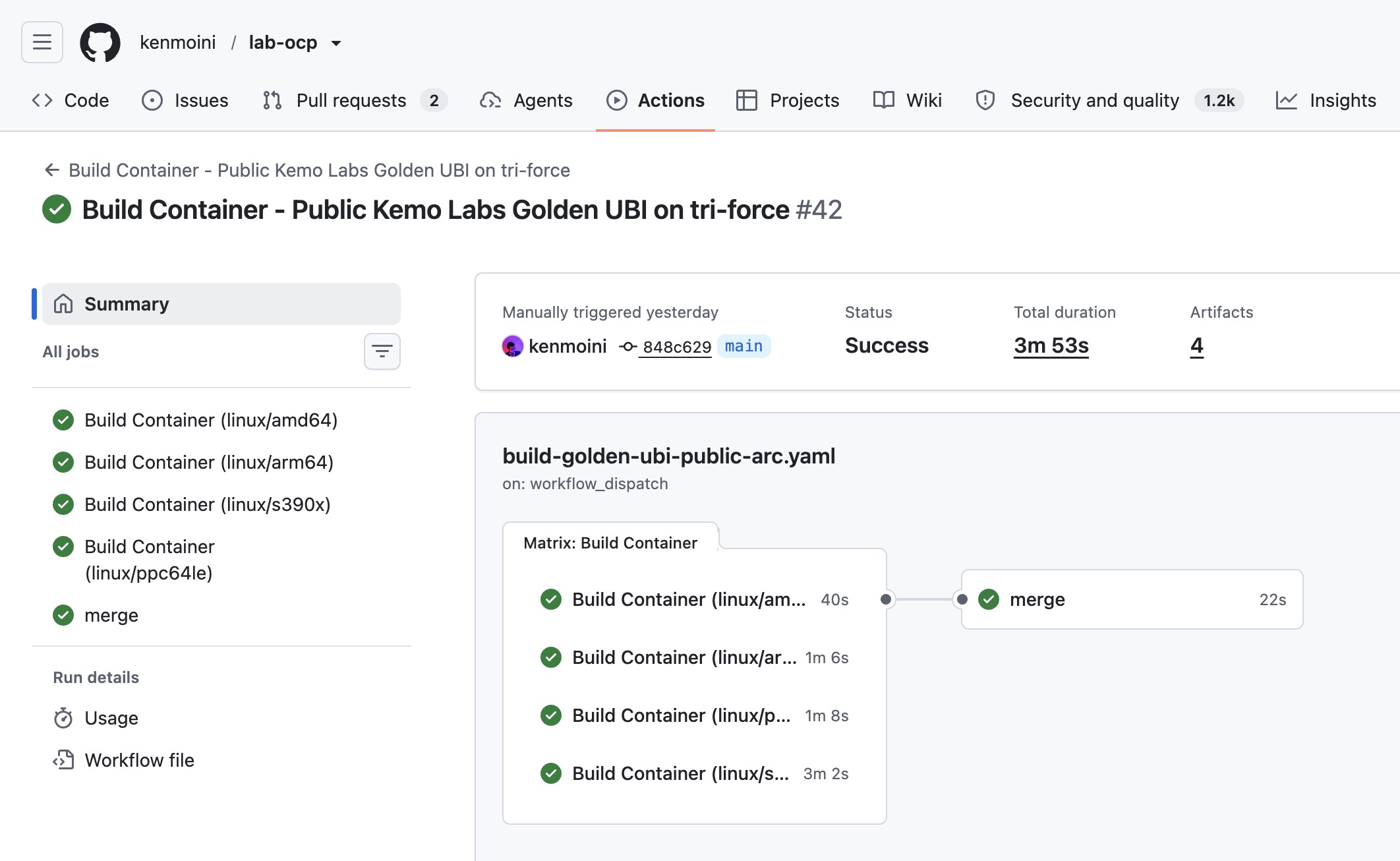
With that Workflow in some file under a repo’s .github/workflows/ path, you can go smash the Workflow Run button to execute it and you should shortly see Pods starting in the arc-systems Namespace on OpenShift. The first Job matrix will spawn a Pod for each architecture being built, then the final merge Job will create another - and before you know it, you’ll have a completed Workflow Run!
Special thanks to Charro Gruver, Chris Peters, and Chris Keller - they walked so I could stumble.

